





Most eKYC decisions get made in the week a product launches and paid for in its twelfth month. A lender switches on Aadhaar OTP eKYC because it converts well, the funnel looks healthy, and a year later the operations team is chasing customers to complete full due diligence before their accounts have to be frozen or closed.
eKYC is the fastest way to verify an Indian customer, but it is a family of methods, and each one carries different rules for a regulated entity (RE). The mode you choose decides whether the account counts as face-to-face, how much it can hold or borrow, and what other institutions can rely on later.
This guide is for the people who own those decisions: compliance heads, KYC operations leads, product teams at banks, NBFCs, fintechs, and securities intermediaries. It covers what eKYC is, how each Aadhaar eKYC mode works, who may use it, the limits that apply, and how to build a fallback path when a mode fails. For the wider regulatory picture, start with our guide to RBI KYC guidelines.
What is eKYC?
eKYC, short for electronic Know Your Customer, is the process of verifying a customer’s identity using digital records instead of physical documents. In India, it usually means Aadhaar eKYC: with the customer’s consent, a regulated entity receives identity data digitally signed by UIDAI, either through online authentication or through an offline file the customer generates.
eKYC full form and meaning
The full form of eKYC is electronic Know Your Customer. Know Your Customer is the due diligence that the Prevention of Money Laundering Act, 2002 (PMLA) requires a reporting entity to complete before it opens an account or starts a business relationship. The “e” changes the source of truth. Instead of photocopies checked by a branch officer, the RE relies on data signed by the Unique Identification Authority of India (UIDAI).
In everyday use, people call almost any digital KYC journey eKYC, including DigiLocker fetches, PAN checks, and video KYC. The regulatory definition is narrower. UIDAI’s Aadhaar (Authentication and Offline Verification) Regulations, 2021 describe the e-KYC authentication facility as one that works only with OTP or biometric authentication, and list Aadhaar Paperless Offline e-KYC separately as an offline verification service. The distinction matters because the rules an RE follows change with the mode.
How eKYC differs from paper-based KYC
| Factor | Paper-based KYC | eKYC |
|---|---|---|
| Source of identity data | Copies of officially valid documents (OVDs) collected by the RE | Data digitally signed by UIDAI |
| How it is verified | Officer compares the copy with the original | Signature validation or a UIDAI authentication response |
| Customer effort | Branch visit or agent visit | Remote, usually in minutes |
| Tampering risk | Edited or forged copies can pass a visual check | Altered data fails signature validation |
| Audit trail | Physical or scanned file | Transaction reference, timestamp and consent log |
What are the types of eKYC in India?
Aadhaar eKYC comes in four modes: OTP-based, biometric (fingerprint or iris), face authentication, and Aadhaar Paperless Offline eKYC using a signed XML file or Secure QR code. The first three are online authentications against UIDAI’s Central Identities Data Repository. The fourth is offline verification, which needs no real-time call to UIDAI.
Aadhaar OTP eKYC
The customer enters their Aadhaar number or 16-digit Virtual ID, UIDAI sends a one-time password to the mobile number linked to that Aadhaar, and the RE submits the OTP through its authentication channel. A correct OTP returns a signed eKYC response. OTP eKYC is the most popular mode for digital onboarding because it needs nothing but a phone, and it is also the mode with the tightest account limits when used without face-to-face contact.
Biometric eKYC
The customer’s fingerprint or iris is captured on a UIDAI-certified registered device and matched against the biometrics stored at enrolment. Because it needs certified hardware, biometric eKYC lives in assisted channels: bank branches, business correspondents and field agents. It remains the workhorse of rural and assisted onboarding.
Aadhaar face authentication
UIDAI matches a live face capture against the photograph on the customer’s Aadhaar record, so a smartphone camera can do the job of a fingerprint scanner. RBI’s KYC (2nd Amendment) Directions of August 2025 explicitly added Aadhaar Face Authentication to its KYC rules, and the same amendment requires that liveness checks in digital KYC do not exclude persons with disabilities. Build that second point into the journey design from the start.
Aadhaar Paperless Offline eKYC (XML and Secure QR)
The customer downloads a password-protected ZIP file from UIDAI’s resident portal and sets a share code to open it. Inside is an XML file signed by UIDAI containing name, date of birth, gender, address and photograph, plus a reference ID that shows only the last four digits of the Aadhaar number. The Secure QR code printed on the Aadhaar letter, e-Aadhaar and mAadhaar carries similar signed data. Any RE can use offline verification with the customer’s consent, which makes it the most widely available mode.
Methods often called eKYC that are something else
DigiLocker journeys fetch documents issued to the customer, such as a driving licence, as equivalent e-documents. Video-based Customer Identification Process (V-CIP) is a live, recorded video interaction with its own rulebook, which often uses Aadhaar eKYC or offline XML inside the call. PAN verification checks a tax identifier against the income tax database. All three belong in a good KYC stack, but none of them is Aadhaar eKYC, and they carry different obligations.
| Mode | How it works | Aadhaar number shared? | Typical channel | Who can use it |
|---|---|---|---|---|
| OTP eKYC | Online authentication; signed eKYC response | Yes, or Virtual ID | Remote app or web | Banks, and entities notified under Section 11A of the PMLA |
| Biometric eKYC | Online fingerprint or iris match | Yes, or Virtual ID | Assisted, certified device | Same as OTP eKYC |
| Face authentication | Online face match to Aadhaar photo | Yes, or Virtual ID | Smartphone or assisted | Same as OTP eKYC |
| Offline XML or Secure QR | RE validates UIDAI’s signature locally | No, last four digits only | Remote or assisted | Any RE, with consent |
How does Aadhaar eKYC work, step by step?
Aadhaar eKYC follows five steps. The RE records the customer’s consent, collects the Aadhaar number or Virtual ID, triggers authentication through a licensed KYC User Agency (KUA), receives a digitally signed eKYC response from UIDAI, and then validates, stores, masks and reports the record. Online modes complete in seconds when the authentication factor works first time.
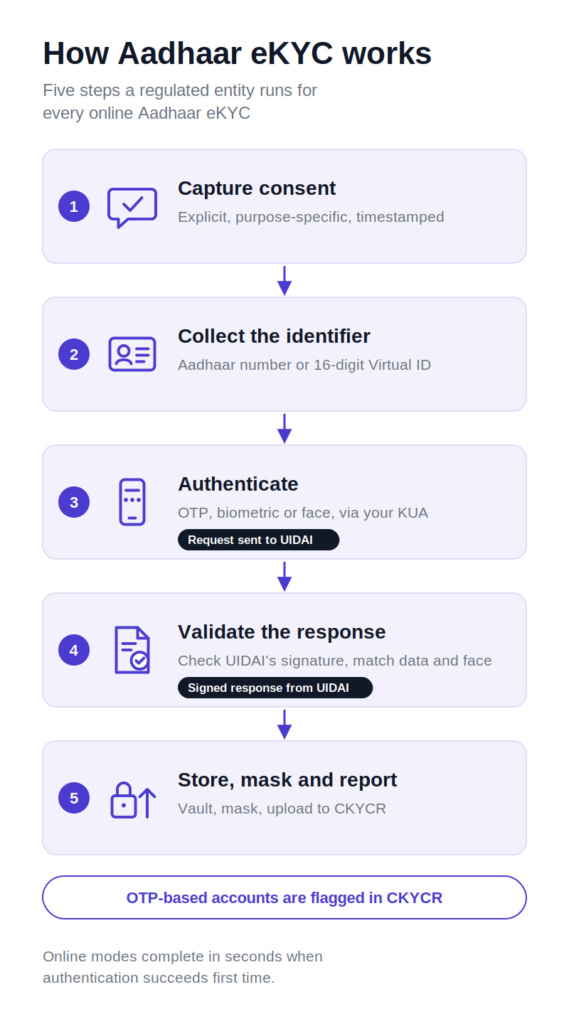
- Capture consent: Take explicit, purpose-specific consent in a language the customer understands, and log it with a timestamp. Consent is a legal precondition under the Aadhaar Act, and it is the first thing an auditor asks for.
- Collect the identifier: Accept the Aadhaar number or the 16-digit Virtual ID. Offering the Virtual ID by default reduces how often the full number enters your systems.
- Authenticate: Send the OTP, biometric or face capture, encrypted on the device, through your KUA licence or through a KUA you are onboarded with as a sub-KUA.
- Receive and validate the response: UIDAI returns signed data: name, date of birth, gender, address and photograph, with a full or masked Aadhaar number. Validate the signature, compare the data with the application, and run a face match against a live selfie where the journey requires one.
- Store, mask and report: Keep any retained Aadhaar numbers only in an Aadhaar Data Vault, mask the number everywhere else, and upload the KYC record to the Central KYC Records Registry (CKYCR), marking OTP-based accounts as such.
In December 2025, Reeju Datta, Co-founder of Cashless Payments said,
“Verifying data alone is not enough. Aadhaar-based eKYC confirms that credentials exist, but it does not confirm who is actually using them.”
He made the point while explaining why banks are moving onboarding towards video KYC because of mule accounts
Which regulated entities can use Aadhaar eKYC?
Banking companies can perform Aadhaar authentication under Section 11A of the PMLA. Other reporting entities, including NBFCs, payment system operators and securities market intermediaries, need a Central Government notification under the same section, issued after consulting UIDAI and their regulator. Any RE can use offline Aadhaar verification with the customer’s consent.
The access model has three layers.
- An Authentication User Agency (AUA) receives a yes or no answer to an authentication request.
- A KYC User Agency (KUA) receives the eKYC data itself.
- A sub-KUA is an entity permitted to use eKYC through a KUA’s licence rather than holding its own connection to UIDAI.
Most NBFCs and intermediaries that use online eKYC do so as sub-KUAs.
For RBI-regulated entities, RBI’s September 2021 circular routes applications from NBFCs, payment system providers and payment system participants for a KUA or sub-KUA licence through the regulator to UIDAI. The Department of Revenue then notifies approved entities in the Gazette.
Securities market entities follow SEBI’s framework, under which intermediaries and mutual fund distributors sign an agreement with a KUA and register with UIDAI as sub-KUAs. This is how most mutual fund eKYC journeys run.
The practical point for anyone scoping a journey: a technology partner can build and run the experience, but the legal permission to authenticate sits with the RE and its KUA arrangement. If your entity is not notified, online eKYC is not yet available to you, and offline verification, DigiLocker and V-CIP are the routes to design around.
What limits apply to OTP-based eKYC accounts?
Accounts opened through Aadhaar OTP eKYC without face-to-face contact carry caps under RBI’s KYC rules: an aggregate deposit balance of up to ₹1 lakh, total credits of up to ₹2 lakh in a financial year, and term loans only, up to ₹60,000 a year. Full due diligence must be completed within one year.
| Condition | What RBI requires |
|---|---|
| Consent | Specific consent from the customer for OTP authentication |
| Deposit balance | Aggregate balance across all deposit accounts up to ₹1 lakh |
| Credits | Aggregate credits across deposit accounts up to ₹2 lakh in a financial year |
| Lending | Term loans only, with aggregate sanctions up to ₹60,000 in a year |
| Time limit | Customer due diligence (CDD) completed within one year; otherwise deposit accounts are closed and borrowal accounts allow no further debits |
| One account rule | Customer declares that no other OTP-based account has been or will be opened with any RE |
| CKYCR flag | RE marks the account as OTP-based when uploading; other REs cannot open accounts on that record |
These conditions date from RBI’s December 2016 amendment and were carried into the entity-specific Know Your Customer Directions, 2025, which replaced the 2016 Master Direction in November 2025. The consolidation was largely as-is, but your compliance team should map each condition to the paragraph numbers in the Directions that apply to your entity type.
OTP eKYC is also permitted for periodic updation of KYC, provided the customer went through full due diligence at onboarding. That makes it a useful re-KYC tool even for REs that avoid it for new accounts.
The year-two test
Before switching OTP eKYC on for a product, ask what the account needs to do twelve months after it opens. Three questions settle it:
- Will a typical customer cross ₹1 lakh in balance or ₹2 lakh in credits during the first year?
- Does the product need anything other than a term loan under ₹60,000, such as a credit line or a credit card?
- Is a conversion journey, usually V-CIP, live and budgeted before the first cohort reaches its anniversary?
If the first two answers are no and the third is yes, OTP eKYC fits. If not, treat OTP eKYC as a temporary state with a planned exit, or start the customer on a mode that supports full due diligence from day one.
How is offline Aadhaar eKYC verified?
The RE receives a password-protected ZIP file containing an XML document signed by UIDAI, plus the share code the customer set. It unzips the file, validates UIDAI’s digital signature, checks when the file was generated, matches the embedded photograph against the customer, and stores only masked data. A file that fails signature validation cannot be trusted.
- Unlock the file with the customer’s share code and parse the XML.
- Validate UIDAI’s digital signature with UIDAI’s public certificate. This is the step that turns a file into evidence.
- Check freshness. For V-CIP, RBI requires that the XML file or Secure QR code was generated no more than three days before the V-CIP session. Many REs apply a similar window to other journeys as internal policy.
- Match the person. Compare the photograph in the XML with a live selfie, backed by a liveness check.
- Verify contact details if needed. The XML carries hashed mobile number and email values, which you can check against the details the customer has given you.
- Store responsibly. Keep the reference ID and masked data, not the share code.
Secure QR verification follows the same logic: scan the code, validate the signature on the data it carries, and match the photograph. The QR code works on a printed Aadhaar letter, which makes it useful in assisted channels.
Why scanning an Aadhaar card isn’t eKYC
Running OCR on a photo of an Aadhaar card reads the printed text but validates nothing, because the printed text carries no signature to check. A photo of an Aadhaar card proves that someone had access to a photo of an Aadhaar card. That is why RBI’s rules say that where a customer submits proof of possession of Aadhaar and offline verification can be carried out, the RE must carry out offline verification.
Where it cannot, the RE falls back to the Digital KYC process, with its live photograph and geo-tagging requirements. OCR still earns its keep for pre-filling forms and catching mismatches, as long as nobody mistakes it for verification.
eKYC vs CKYC vs Video KYC: what is the difference?
eKYC is a way to verify identity using Aadhaar data signed by UIDAI. CKYC is the central registry, run by CERSAI, where verified KYC records are stored and shared between institutions. Video KYC, or V-CIP, is a live, recorded video process that RBI treats as equivalent to face-to-face onboarding. Mature onboarding journeys use all three together.
| eKYC | CKYC | Video KYC (V-CIP) | |
|---|---|---|---|
| What it is | Identity verification using UIDAI-signed data | Central registry of verified KYC records | Live, recorded video identification |
| Run by | UIDAI, through KUAs | CERSAI | The RE, using its own officials |
| What the RE gets | Signed name, date of birth, gender, address and photo | An existing KYC record, retrieved with the customer’s KYC Identifier | A face-to-face equivalent verification with audit trail |
| Face-to-face status | Depends on mode; OTP eKYC without contact is non-face-to-face | Inherits the status of the original KYC | Treated as face-to-face |
| Role in the journey | Primary identity source | Reuse before re-verifying | Full KYC remotely, or conversion of OTP accounts |
The three connect. Under the 2025 Directions, if a customer has a KYC Identifier, the RE fetches the record from CKYCR first. A completed eKYC is uploaded to CKYCR, with OTP-based records flagged. V-CIP often uses offline XML or Aadhaar eKYC as the identity source during the call, and it is the standard route for converting OTP-based accounts within their one-year window. Read more in our guides to CKYC, V-CIP and CERSAI 2.0.
Where does eKYC fail, and what should the fallback be?
eKYC fails most often for four reasons: the customer’s mobile number is not linked to Aadhaar, the biometric capture is poor, the face match is rejected, or the offline file is stale or tampered with. A good journey moves the customer to the next valid mode without restarting, and records why each attempt failed.
| Failure point | What the customer experiences | Fallback |
|---|---|---|
| Mobile not linked to Aadhaar | The OTP never arrives | Offer face authentication or offline XML immediately, before the customer retries |
| Poor biometric capture | Repeated fingerprint mismatches, common for manual workers and older customers | Switch to iris or face authentication on the same device |
| Face match rejected | Rejection caused by lighting, an old enrolment photo or accessibility needs | Guided retry, then V-CIP with a trained official |
| Offline file stale or invalid | Upload rejected | Ask the customer to regenerate the file; route signature failures to fraud review |
| UIDAI or KUA downtime | Timeouts | Queue and retry, and offer offline XML in the meantime |
The order we recommend is a fallback ladder: fetch from CKYCR if a KYC Identifier exists, then OTP eKYC, then face authentication, then offline XML or Secure QR, then V-CIP, with assisted onboarding as the last rung. Each rung is a valid KYC route in its own right, so a failure on one rung is a routing decision rather than a rejection.
“A rejected face match is usually a lighting problem or an old enrolment photo, not a fraudster. Treat it as a routing decision for real customers, and save the hard stop for injected feeds and replays.”
-Kedar Parikh, CPO, HyperVerge
There is a regulatory reason to get this right. Since August 2025, RBI’s KYC rules state that no onboarding or periodic updation application may be rejected without application of mind, and the reasons must be recorded. A journey that dead-ends after one failed OTP makes that hard to show. Track first-pass success by mode and keep a reason code for every failure; it is the fastest way to find which rung is costing you customers.
What data protection rules apply to eKYC data?
Aadhaar eKYC data is governed by the Aadhaar Act and UIDAI’s regulations, and personal data more broadly by the Digital Personal Data Protection Act, 2023 and its Rules. REs must take informed consent, keep any retained Aadhaar numbers in an Aadhaar Data Vault, mask the number everywhere else, and use the data only for the consented purpose.
- Aadhaar Data Vault. Any Aadhaar number an RE retains must sit in an encrypted vault, referenced elsewhere by a token. Your CRM, loan management system and data warehouse should never hold the full number.
- Masking. Display and store only the last four digits outside the vault. Document copies collected from customers should have the first eight digits redacted. Our post on RBI’s Aadhaar masking rules covers this in detail.
- No biometric storage. Biometric and face captures are used for authentication and must not be stored by the RE.
- Purpose and retention. Use eKYC data for the purpose the customer consented to. PMLA requires KYC records to be kept for five years after the business relationship ends, which your DPDP retention and erasure policies need to accommodate. See our DPDP Act guide.
How HyperVerge supports eKYC for regulated entities
We build the parts of an eKYC journey that decide whether a customer passes first time: Aadhaar verification APIs, offline XML and Secure QR validation, face match and liveness checks against the Aadhaar photograph, and orchestration that routes a customer to the next valid mode when one fails, through to Video KYC when full due diligence is needed. Every attempt is logged with a reason code, so your compliance team can show why a customer was routed, retried or rejected.
If you are planning an eKYC rollout or reviewing one that converts well but leaks at conversion time, talk to our team about mapping your products to the right modes.