






Biometric authentication is the use of unique physical or behavioural traits, such as a face, fingerprint, voice, or iris, to confirm a person’s identity at the moment they try to access a system. It replaces what you know (a password) and what you have (an OTP) with what you are. That shift matters because the first two get phished, leaked, or shared, while the third travels with the user and is far harder to fake at scale.
We will keep this practical. The next 2,500 words walk through what biometric authentication actually is, the eight modalities that matter in 2026, how it fits inside Aadhaar and Indian onboarding, where it stands against passwords and passkeys, and how to spot a credible vendor.
What Biometric Authentication Is (and How It Differs From Verification)
Biometric authentication confirms a person is the same individual who enrolled, using a live biometric capture matched against a stored template. The system reads a trait, builds a mathematical representation, and checks whether it lines up with what was stored at enrolment. The match is probabilistic, not exact: the score has to clear a threshold the operator sets.
That definition shapes everything else. The threshold is a business decision. The trait is a design decision. The storage location, on-device or server-side, is a privacy decision.
Authentication vs. verification vs. identification
Vendors use these three terms inconsistently, which causes real confusion in procurement. Here is a clean split:
| Operation | What it answers | Example |
|---|---|---|
| Authentication | Is this the live person who enrolled? (1:1 + liveness) | Re-logging into a banking app with face unlock |
| Verification | Does this face match the ID photo? (1:1) | Selfie compared to the photo on a PAN card during eKYC |
| Identification | Who is this face among many? (1:N) | Picking a person out of a watchlist |
Biometric identity verification systems usually combine the second and third. Authentication is what happens after enrolment, every time the user comes back.
The reason these distinctions matter is operational. A 1:1 match has lower compute cost, lower false-accept risk, and clearer regulatory framing. A 1:N search scales differently and carries different privacy obligations. Buying the wrong one is expensive.
How Biometric Authentication Works
The capture, template, and match pipeline
Every biometric system runs the same four steps: capture, extract, store, match.
Capture is the sensor reading: a camera frame, a fingerprint scan, a microphone clip. Extraction turns that raw signal into a feature vector, the small set of numerical descriptors that distinguishes one person from another. Storage holds an encrypted or hashed template, never the raw image. At authentication time, a fresh capture goes through the same extraction, and the system compares the live template to the stored one. The output is a similarity score. If it clears the threshold, the user is in.
The single most misunderstood part of this is what gets stored. A modern biometric system never keeps your fingerprint photo or your face image. It keeps a one-way representation that cannot be reversed back into a usable picture. That is the difference between a database breach being inconvenient and being catastrophic.
On-device vs. server-side templates
Where the template lives changes the whole risk profile.
On-device storage, used by Apple Face ID and Android secure enclaves, keeps the template in tamper-resistant hardware on the user’s phone. The match happens locally; the server only sees a yes-or-no signal. Privacy is high; cross-device authentication is harder.
Server-side storage centralises templates so any device can authenticate against them. Aadhaar uses this model. It enables national-scale authentication but raises the bar on encryption, key management, and breach response.
Hybrid patterns, like FIDO2 and WebAuthn, split the work. The biometric match is local; the server only verifies a cryptographic signature the device produced after a successful local match. That is the approach modern passkeys use.
Why thresholds matter
Three numbers govern every biometric system: False Accept Rate (FAR), False Reject Rate (FRR), and Equal Error Rate (EER), the point where the two cross.
A bank operating high-value transfers wants a very low FAR even if the FRR rises and a few legitimate users have to retry. A consumer app unlocking a phone wants the opposite: low FRR, slightly higher FAR, because friction kills retention. Same algorithm, different threshold, different product.
A vendor that quotes “99% accuracy” without naming the FAR, FRR, or test conditions is selling something that cannot be evaluated.
Types of Biometric Authentication
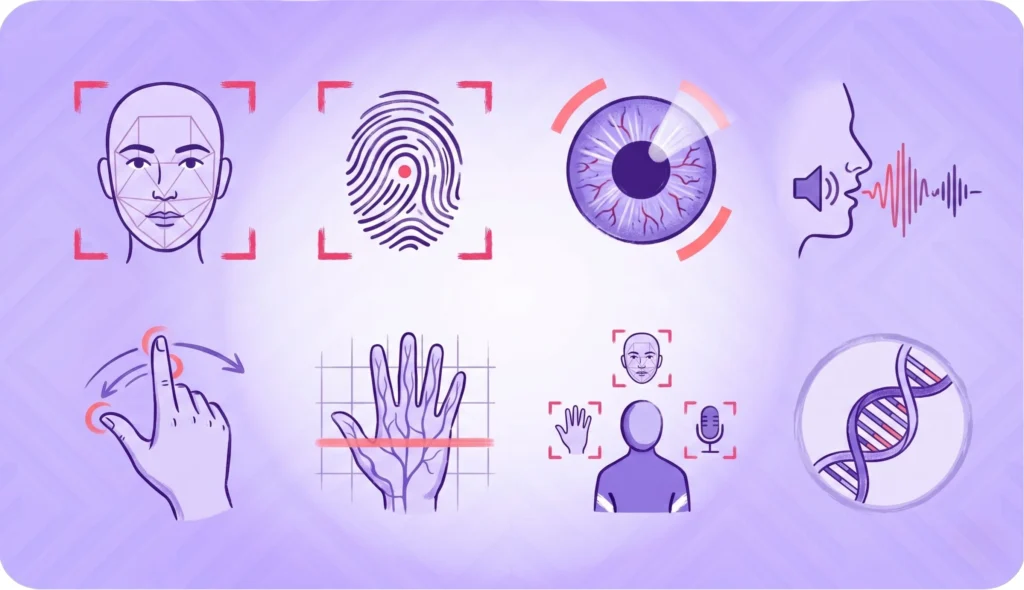
The industry has moved well past the four obvious modalities. These are the eight that matter for digital onboarding and enterprise authentication in 2026.
Face authentication
Capture is a single camera frame. The system runs face detection to find the face, applies passive liveness to confirm it is a real person, then matches the live face to the enrolled template.
Pros: contactless, fast, no extra hardware, native to every phone and laptop. Cons: vulnerable to deepfake injection, sensitive to lighting, demands careful demographic-bias testing. Best for: digital onboarding, video KYC, mobile re-authentication.
Fingerprint
Capacitive, optical, or ultrasonic sensors read the ridge pattern. The mature workhorse of biometric authentication and the modality Aadhaar enrolment depends on most.
Pros: high accuracy, well-understood, low hardware cost. Cons: requires a sensor, fails on wet, dry, or damaged fingers, struggles with manual labour wear. Best for: smartphone unlock, workforce access, the bulk of Aadhaar-linked authentication.
Iris and retinal
Near-infrared cameras read the iris pattern, which has more entropy than a fingerprint. Retinal scanning reads the blood-vessel pattern at the back of the eye and is rarer in commercial use.
Pros: extremely high accuracy, anti-spoofing easier than face. Cons: dedicated hardware, user friction, awkward at consumer scale. Best for: high-security access control, Aadhaar enrolment as a fingerprint fallback.
Voice
Speaker recognition combined with liveness checks. The phone-channel-native modality.
Pros: works over the existing voice infrastructure, no camera needed. Cons: vulnerable to recordings and synthesis, sensitive to illness or aging. Best for: contact-centre authentication, IVR-driven flows.
Behavioural biometrics
Keystroke dynamics, mouse rhythm, swipe patterns, and gait. The signal that runs in the background of a session.
Pros: continuous and invisible, hard to replicate at scale. Cons: noisy signal, needs session-length learning, weak as a single factor. Best for: continuous fraud monitoring, account-takeover defence layered on top of other modalities.
Vein and palm
Near-infrared imaging of the vein pattern under the skin. Liveness is inherent because blood flow is part of the signal.
Pros: very high accuracy, anti-spoofing built in. Cons: niche hardware, slow rollout outside Japan and South Korea. Best for: high-security workforce access, hospital systems.
Multimodal biometric authentication
Combining two modalities, such as face and voice, or fingerprint and behavioural. Two weak signals combined often beat one strong signal, because the failure modes are independent.
A face match alone has a known FAR. A face match plus passive liveness plus device fingerprint has a much lower joint FAR. That is how modern stacks work, and it is why HyperVerge treats face plus liveness as a single bundled signal in its face authentication flow.
Modalities to be cautious about
DNA, lip-movement, and ear-shape biometrics turn up in vendor pitches. They are real research areas. They are not deployed at meaningful enterprise scale in 2026, and most buyers should ignore them.
Aadhaar and Biometric Authentication in India
India runs the largest biometric authentication system in the world, and it shapes how every Indian fintech, bank, and gaming platform thinks about identity.
Aadhaar’s biometric stack
UIDAI captures 10 fingerprints, two iris scans, and a face photo at enrolment. It then offers authentication services that any registered entity can call: Yes/No biometric, demographic plus biometric, OTP, and face authentication.
The volume is what makes the system real. UIDAI recorded 2,707 crore Aadhaar authentication transactions in financial year 2024-25, with 247 crore in March 2025 alone. That is more authentication traffic than every other national identity system combined.
UIDAI’s Face Authentication API
Face authentication was added to Aadhaar to solve a real operational problem: fingerprint quality degrades for older citizens and manual labourers, two large segments of the Indian population. A face capture works where a worn fingerprint does not.
The Face Authentication API requires a live capture (not an uploaded photo), checks for liveness, and returns a yes-or-no match against the stored Aadhaar face template. Allowed use cases sit inside the UIDAI authentication framework: pension disbursement, ration delivery, Aadhaar eKYC for opening accounts.
RBI and SEBI rules touching biometric authentication
The Reserve Bank of India’s Master Direction on KYC sets out the Video KYC framework that most Indian banks and NBFCs follow for new account opening. The relevant clauses for biometrics: a live face capture, geo-tagging of the customer location, and a Regulated Entity official conducting the interaction. The face match is one of the controls, not the whole control.
Re-KYC under the RBI master direction is risk-classification based and requires periodic re-confirmation, which biometric authentication shortens from days to seconds. SEBI’s KRA-KYC framework treats biometric assertion as a valid step inside the broader investor-onboarding flow.
DPDP Act implications for biometric data
India’s Digital Personal Data Protection Act, 2023, treats biometric templates as personal data. Storage, processing, and consent rules apply. The practical implications for any company deploying biometric authentication: hash or encrypt templates, prefer on-device processing where the use case allows, log purpose at every authentication, and make the consent specific to biometric use, not buried inside a generic privacy policy.
Biometric Authentication in Digital Onboarding
The single highest-stakes biometric moment is the first one, when a user is becoming a customer.
The onboarding flow with biometrics
A modern digital onboarding flow runs roughly like this: the user uploads an ID document, takes a selfie, the selfie passes through face detection and passive single-image liveness, the live face matches against the photo on the ID, and an enrolled biometric template is created for future authentication. AML checks run in parallel.
That whole sequence happens in seconds. HyperVerge orchestrates it as one API call inside its onboarding stack, which is the design choice that separates a verification platform from a stitched-together collection of point tools.
Why onboarding is the highest-stakes biometric moment
This is the moment when synthetic identity, deepfake injection, and presentation attacks all hit. The attacker has time, a good camera, and the freedom to keep retrying.
Threshold tuning here is harder than at phone unlock. You need a low enough FAR to keep fraudsters out, but a low enough FRR to keep conversion up. Get it wrong and either fraud rises or genuine users abandon at the selfie step. Most vendor demos quietly skip this tradeoff. Procurement should not.
Re-KYC and step-up authentication
Once a user is enrolled, biometric authentication gets cheaper and more frequent. Re-KYC under the RBI master direction is a periodic event. Step-up authentication, asking for a fresh biometric on a high-value transaction, is a per-transaction event. Both rely on the enrolled template the onboarding flow created.
The convenience-versus-security tradeoff plays out at this layer. A bank that demands face authentication on every login burns user goodwill. A bank that never asks accepts more risk. The right answer is risk-based: friction goes up with the size of the action.
Biometric Authentication vs. Traditional MFA
Password plus OTP
The legacy model: something you know plus something you have. Cheap to deploy, well-understood, and broken in 2026. SIM-swap fraud lifts the OTP. Phishing kits intercept both factors. Users reuse passwords across sites and the leaked credentials power the next attack.
This is still the most common authentication setup in Indian financial services, and it is the one biometrics is replacing fastest.
FIDO2, WebAuthn, and passkeys
The standard the industry has converged on. A local biometric (face or fingerprint) unlocks a private key on the device. The server gets a signed assertion, not the biometric itself. The biometric never leaves the device, and the cryptographic key is unphishable.
This is the highest-trust pattern available today and the long-term answer to passwords. Apple, Google, and Microsoft all support it. Adoption is growing fastest in consumer-grade apps; financial services are slower because of regulatory inertia and legacy stacks.
Face authentication of the kind HyperVerge provides complements FIDO2, it does not compete with it. Passkeys handle the daily login. Server-side biometric authentication handles the high-stakes moments: opening a new account, releasing a large transfer, recovering an account when the device is lost.
When biometric-only is appropriate
For low-friction onboarding where step-up authentication exists at transaction time, biometric-only is fine. For phone unlock and consumer apps it is the norm. For irreversible actions, biometric should never be the only factor. Pair it with something else.
Anti-Spoofing and Presentation-Attack Defence
If liveness fails, the rest of the biometric stack is theatre. This is the section most vendor decks skip.
Presentation attack types
Four categories cover most real-world attacks:
- Print attack: a printed photo of the target’s face held in front of the camera.
- Replay attack: a video of the target playing on a screen.
- Mask attack: a silicone or latex mask, increasingly affordable.
- Deepfake injection: a synthetic video stream injected at the camera level, bypassing the lens entirely.
The first three target the lens. The fourth bypasses it. Defences for each are different.
Liveness detection: passive vs. active
Active liveness asks the user to perform a gesture: blink, smile, turn the head. It catches print and replay reliably but adds friction.
Passive liveness, the approach HyperVerge ships, runs on a single image and asks the user to do nothing. It looks for signal artifacts, depth cues, and sub-pixel patterns that distinguish a real face from a printout or screen replay. Lower friction, lower drop-off, comparable security against print and replay attacks. Active liveness still has its place for the highest-security flows; passive is the default for consumer onboarding.
Certifications: iBeta and ISO 30107
ISO/IEC 30107-3 is the international standard for Presentation Attack Detection (PAD). iBeta runs the conformance testing most enterprise buyers ask for. There are three levels: Level 1 covers basic spoofs (printed photos, screen replays), Level 2 covers more sophisticated artifacts (silicone masks, paper masks with cutouts), and Level 3, introduced more recently, raises the bar further.
To pass any level, a system must achieve zero penetration on the spoof attempts while keeping the bona-fide presentation rejection rate at or below 15% for Levels 1 and 2 (10% for Level 3). Spotting deepfakes and defending against face spoofing are not part of the iBeta scope; they are separate controls a credible vendor should also have.
Certification is necessary, not sufficient. A vendor with iBeta Level 2 and a track record on deepfake examples is a much stronger bet than one with just the certificate.
How to Evaluate a Biometric Authentication Vendor
A short checklist, ordered by what actually matters during procurement.
The criteria that matter
- Modalities supported and their FAR/FRR at the conditions you will deploy in (not at the demo). Ask for test reports, not marketing pages.
- iBeta certification, Level 1 minimum, Level 2 if the use case is high-stakes. Ask for the dated confirmation letter.
- Demographic-bias testing transparency. Ask which population groups the model has been tested on and where the accuracy gaps sit.
- DPDP and GDPR posture: data residency, on-device options, encryption-at-rest, key-management story.
- Deepfake-defence track record. Ask what the vendor did the last time a major deepfake bypass was reported in the press.
- Integration model. SDK gives speed; API gives flexibility; hybrid is best for most enterprise stacks. The right face match API and face authentication API come with both.
- Enterprise liveness detection handling at scale: latency, throughput, and degradation under load.
Red flags to watch for
A “99% accuracy” claim with no test conditions named. No iBeta or ISO 30107 reference. Server-side template storage with no key-management story. No specific response to the last public deepfake incident. Reluctance to show a real test environment with live data.
If three or more of these turn up, the vendor is selling a demo, not a system.
See How It Works
HyperVerge’s face authentication and passive liveness power digital onboarding for India’s largest banks, fintechs, and gaming platforms. Talk to our team to see the liveness check and face-auth flow on real traffic. Book a demo.
FAQs
What is biometric authentication?
Biometric authentication is the use of unique physical or behavioural traits, such as a face, fingerprint, voice, or iris, to confirm a person’s identity. It replaces passwords and OTPs with a live biometric capture matched against a stored template, and is harder to phish or share than knowledge-based factors.
How does biometric authentication work?
A sensor captures the trait, software extracts a mathematical template, and the system compares a fresh capture to the stored template at login. The match returns a similarity score. If the score clears the operator’s threshold, the user is authenticated. Templates are encrypted, never raw images.
What are the types of biometric authentication?
The eight that matter in 2026: face, fingerprint, iris and retinal, voice, behavioural (keystroke, mouse, gait), vein and palm, multimodal combinations, and a few research-stage modalities like DNA and ear shape. Most enterprise stacks rely on face plus fingerprint plus behavioural signals layered together.
Is biometric authentication secure?
Yes, when paired with liveness detection and good threshold tuning. Biometrics resist phishing and credential theft, two attacks that defeat passwords routinely. Risks are real but manageable: presentation attacks, deepfakes, and template-database breaches all have known defences and certified test methods like ISO 30107-3.
What are examples of biometric authentication?
Apple Face ID unlocking a phone, Aadhaar fingerprint authentication for opening a bank account, voice authentication on a contact-centre call, palm-vein scanners on hospital systems, and selfie-plus-liveness onboarding for fintechs. Each uses the same capture-extract-match pipeline with different sensors and thresholds.
Can biometric data be hacked?
Stored biometric templates can be stolen, but a well-designed system stores them as one-way hashes that cannot be reversed into usable images. The bigger risk is presentation attacks: spoofs presented to the sensor. iBeta-certified liveness detection at Level 1 or Level 2 is the defence, paired with deepfake monitoring.
What is the difference between biometric authentication and verification?
Authentication answers “is this the live person who enrolled?” and runs every time the user comes back. Verification answers “does this face match the ID photo?” and runs once during onboarding. Authentication is 1:1 with liveness; verification is 1:1 against a document.
Is biometric authentication legal in India?
Yes, under the DPDP Act, 2023, and the Aadhaar Act for UIDAI-related authentication. The legal requirements: hash or encrypt biometric templates, take specific consent for biometric processing, log purpose at every authentication, and meet UIDAI guidelines for any Aadhaar-linked use.